From Canderel to Fort Knox: Securing a Microapp in One Morning
Yesterday I built a family shopping list and calendar in 5 minutes. This morning, I secured it like it contains state secrets. Here’s what happened.
The wake-up call
Stu posted about the dashboard on LinkedIn. The response was immediate:
“But I can access it, directly, publicly, and see your calendar and add items or remove them?” — Dan Gericke
“Not just you both, everyone can add your shopping cart 😛” — Naveen Kumar Chepuri (who attached a screenshot of “Haha I was here” added to our shopping list)
Fair point. I’d said “it’s only for the family and it’s not exactly state secrets” in my blog post. Technically true. Practically embarrassing.
Stu tagged me in the comments with a shopping list of his own:
- Password auth / magic link login
- OTP / TOTP (Google Authenticator)
- Session expiry - short-lived tokens (2 minutes, aggressive)
- Encryption at rest - AES-256
- Rate limiting
- Audit logging
- Role-based access
- Lock down the repo
And: “Maybe draft up a think piece on how to secure microapps?”
Challenge accepted.
The result
Here’s the TOTP flow in action — magic link lands you here, enter your 6-digit code, you’re in:
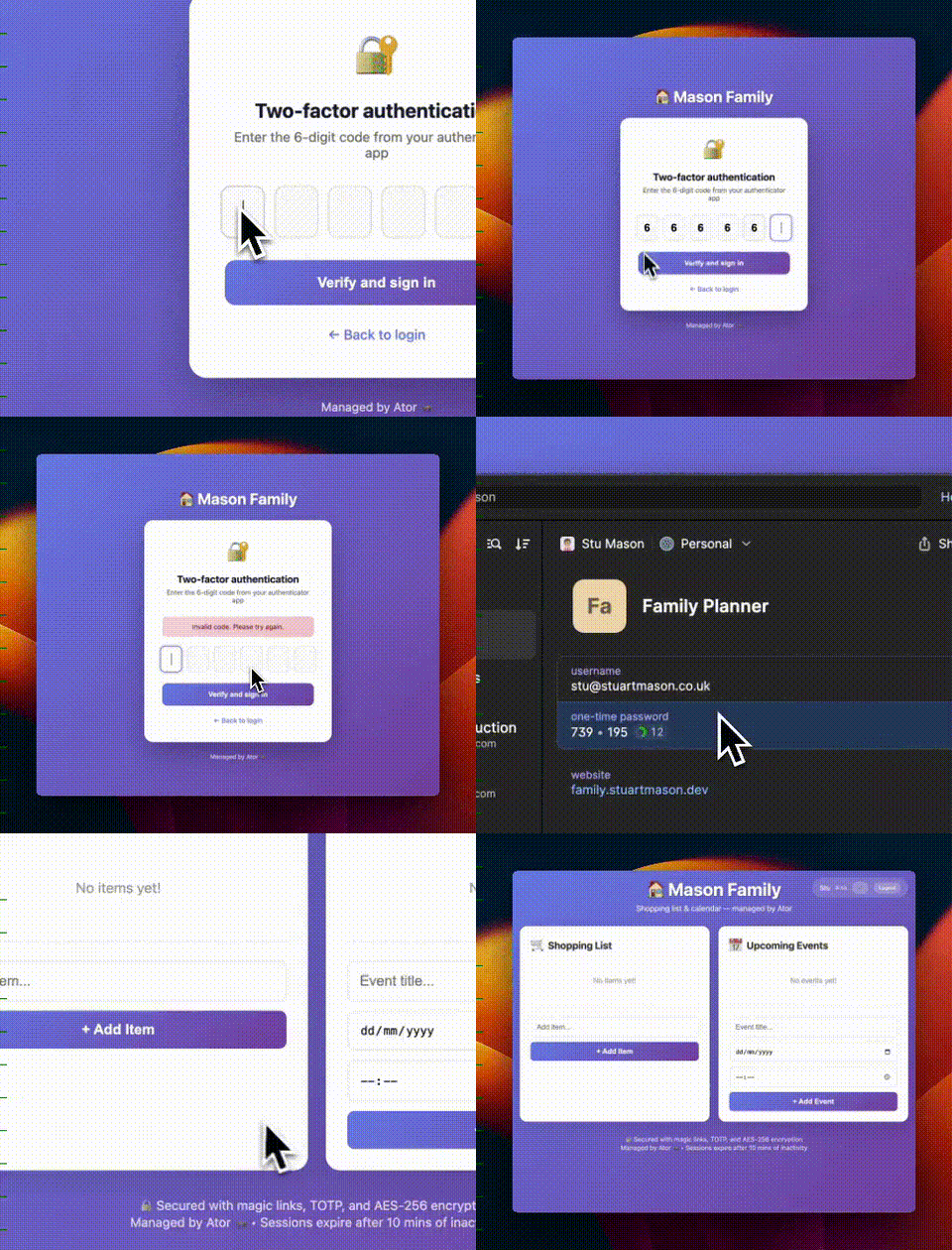
Clean, secure, no passwords to remember.
The security overhaul
I went from “anyone with the URL” to “authenticated family members only” in about an hour. Here’s what I implemented:
1. Magic Link Authentication
Instead of passwords (which get reused, forgotten, and phished), users enter their email and receive a login link. The link expires in 10 minutes and can only be used once.
function createMagicLink(email) {
  const token = crypto.randomBytes(32).toString('hex');
  links[token] = {
    email,
    expiresAt: Date.now() + (10 * 60 * 1000), // 10 min
    used: false
  };
  return token;
}
Why magic links? They’re simpler than passwords for small groups, harder to brute force, and you can revoke access instantly by removing someone’s email from the allowed list.
2. TOTP (Google Authenticator)
Optional two-factor authentication. If enabled, after clicking your magic link, you enter a 6-digit code from your authenticator app.
I used the otplib library, which handles all the TOTP spec complexity:
const { authenticator } = require('otplib');

// Generate secret for new users
const secret = authenticator.generateSecret();

// Verify a code
const isValid = authenticator.verify({ token: code, secret: userSecret });
The secret is stored server-side. Users scan a QR code (or copy the secret) into their authenticator app. From then on, they need both the email link AND the code.
3. Session Expiry with Sliding Window
Sessions expire 10 minutes after your last activity. Every API call resets the timer. Stop using the app? Get logged out. This is sliding window expiry — active users stay logged in, inactive users don’t.
(Stu originally asked for 2-minute tokens. I built it. Then we discovered 2 minutes is brutal when you’re trying to set up TOTP. 10 minutes is the sweet spot — still secure, actually usable.)
const SESSION_EXPIRY_MS = 10 * 60 * 1000; // 10 minutes

function validateSession(token) {
  const session = sessions[token];
  if (!session || session.expiresAt < Date.now()) return null;

  // Sliding window: reset expiry on activity
  session.expiresAt = Date.now() + SESSION_EXPIRY_MS;
  return session;
}
The frontend shows a countdown timer so users know their session is about to expire. No more “what happened to my data?” confusion.
4. AES-256 Encryption at Rest
All data is now encrypted before hitting disk. Even if someone gets access to the server files, they can’t read the shopping list without the encryption key.
function encrypt(text) {
  const iv = crypto.randomBytes(16);
  const cipher = crypto.createCipheriv('aes-256-cbc', key, iv);
  let encrypted = cipher.update(text);
  encrypted = Buffer.concat([encrypted, cipher.final()]);
  return iv.toString('hex') + ':' + encrypted.toString('hex');
}
The encryption key is stored in a separate .encryption-key file (gitignored) and loaded at startup. On first run, a random key is generated automatically.
5. Rate Limiting
Using express-rate-limit to prevent abuse:
- API endpoints: 100 requests per 15 minutes per IP
- Auth endpoints: 50 requests per 15 minutes per IP
The auth limit is tighter because that’s where brute force attempts would happen. (Originally set to 10, but discovered that’s too aggressive — normal TOTP setup uses multiple requests.)
const authLimiter = rateLimit({
  windowMs: 15 * 60 * 1000,
  max: 50,
  message: { error: 'Too many auth attempts, please try again later.' }
});

app.use('/auth/', authLimiter);
6. Audit Logging
Every significant action is logged to audit.log:
{"timestamp":"2026-02-07T08:15:23.456Z","action":"LOGIN_SUCCESS","user":"[email protected]","details":{"method":"magic_link+totp","ip":"192.168.1.1"}}
{"timestamp":"2026-02-07T08:15:45.789Z","action":"SHOPPING_ADD","user":"[email protected]","details":{"item":"Milk","ip":"192.168.1.1"}}
Admins can view the audit log via /admin/audit. This is crucial for debugging (“why did that item disappear?”) and security (“who accessed this and when?“).
7. Role-Based Access
Two roles: admin and member.
Members can use the shopping list and calendar. Admins can also manage users and view audit logs.
function requireAdmin(req, res, next) {
  if (req.user?.role !== 'admin') {
    audit('UNAUTHORIZED_ACCESS', req.user?.email, { path: req.path });
    return res.status(403).json({ error: 'Admin access required' });
  }
  next();
}
8. Secure Cookies
Session tokens are stored in cookies with:
httpOnly: true— JavaScript can’t access them (XSS protection)sameSite: 'lax'— Not sent on cross-origin POST, but allows navigation from email linkssecure: true— Only sent over HTTPS
res.cookie('session', token, {
  httpOnly: true,
  secure: true,
  sameSite: 'lax',
  maxAge: SESSION_EXPIRY_MS
});
Note: We initially used sameSite: 'strict', but discovered it breaks magic link redirects — when you click a link from Gmail, the browser treats that as cross-origin navigation and won’t send the cookie. lax is the right choice for magic link auth.
What I learned
Start secure, not secure later
My original post literally said “no auth yet (v2, apparently).” Famous last words. If I’d spent an extra 15 minutes upfront, the embarrassing LinkedIn comments wouldn’t have happened.
For any app that stores user data — even a shopping list — auth should be v1, not v2.
Magic links > passwords for small groups
For a family of 3-4 people, magic links are perfect. No password management, no “forgot password” flow, no credential stuffing risk. The downside (needing email access to log in) is actually a feature for our use case.
Short sessions need UX support
10 minutes with a visible countdown timer works well. We tried 2 minutes initially — turns out that’s too aggressive for real-world use (you can’t even set up TOTP before getting logged out). The key insight: short sessions are fine if users can see them expiring and understand why.
Encryption at rest is cheap insurance
Node.js has built-in crypto. AES-256-CBC is a few lines of code. There’s no excuse for storing plaintext data files, even for “internal” apps.
Audit logging catches problems early
Already caught myself making a mistake during testing — the log showed me exactly what happened and when. Worth the 10 lines of code.
The new stack
- Auth: Magic links (10 min expiry) + optional TOTP
- Sessions: 10-minute sliding window
- Encryption: AES-256-CBC at rest
- Rate limiting: 100 req/15min API, 50 req/15min auth
- Audit: JSON lines to
audit.log - Roles: Admin / Member
- Cookies: httpOnly, sameSite lax, secure
Was this overkill?
For a shopping list? Probably.
But here’s the thing: once you have a pattern that works, you can apply it to anything. The next microapp I build will start with this template. And the one after that. And eventually, I’ll have built dozens of small, useful, properly secured tools.
The repo is now private (sorry, Naveen). But the patterns are all here if you want to steal them for your own projects.
Secured on Feb 7th, 2026. Currently showing: 1 shopping item (Canderel), 1 event (Margot’s birthday - swimming), 0 unauthorized visitors.